Face Swap Magic - Photo Editor
- 3.1
- Rating
- 100.00K
- Installs
- Free
- Price
 Analysis by App-foxy
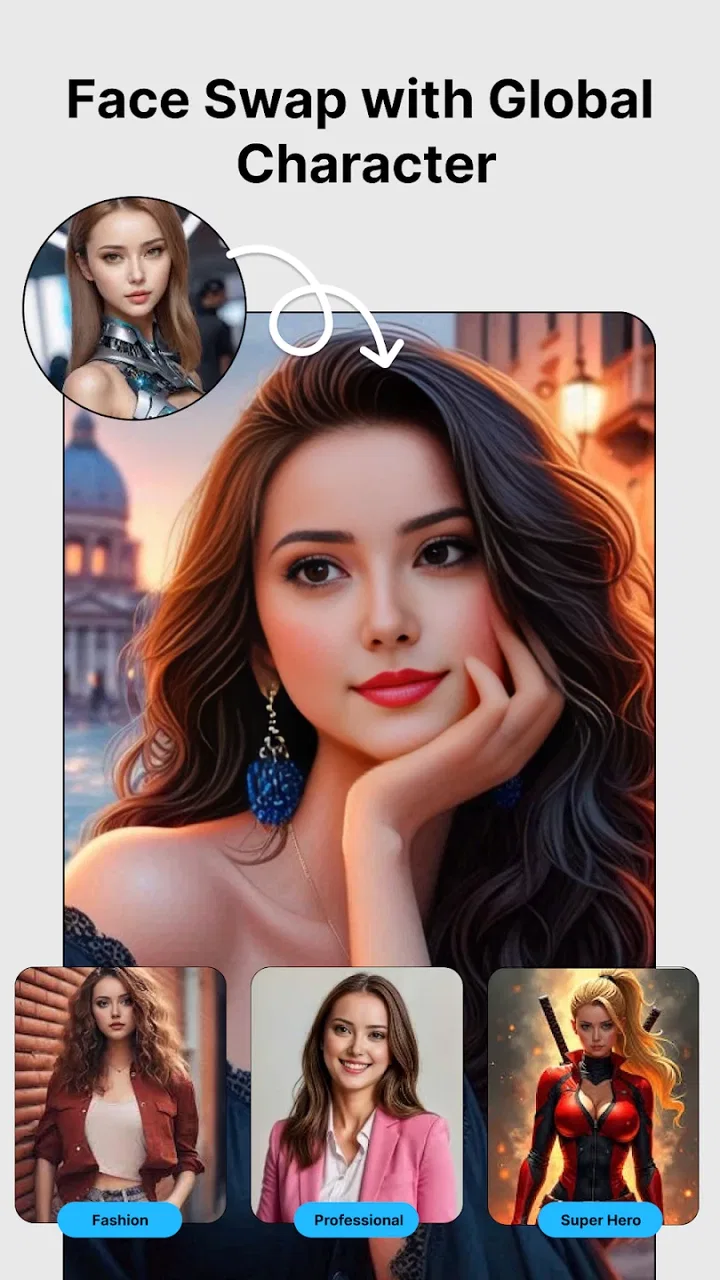
I tried Face Swap Magic - Photo Editor as a quick way to experiment with AI face effects rather than as a full photo-editing suite. The app sits in the beauty category, and its main appeal is easy to understand: you choose a suitable image, apply a face-swap or avatar-style effect, and decide whether the result is entertaining, shareable, or simply worth keeping for yourself. My overall impression is that it is more useful for casual visual experiments than for careful retouching.
That distinction matters. If you want a simple face transformation without learning a complicated editor, this app has an approachable purpose. If you need precise control over skin texture, lighting, masks, layers, or professional exports, I would look at a more complete photo editor instead. Face Swap Magic is best judged by how quickly it turns an ordinary portrait into something playful, not by standards meant for advanced editing tools.
What I looked for before recommending it
When I assess a face-swap app, I do not begin with the most dramatic example in its store presentation. I first ask whether the basic workflow feels understandable, whether the source photo is handled sensibly by the effect, and whether the output remains pleasant when viewed outside the app. A convincing result depends heavily on the original image, so a tool can appear impressive in one picture and awkward in another.
You May Also Like

 Blood Strike: 2.5 Anniversary
Blood Strike’s Loadouts Turn Every Drop Into a Tactical Gamble
A close look at Blood Strike’s custom loadouts: how fast access to signature weapons reshapes its battle royale rhythm, rewards preparation, and narrows the gap between fights.

 Pandora - Music & Podcasts
Pandora’s Music Is Easy to Start, but Harder to Recover
Pandora’s strength is its low-effort path from a seed to a station. Its weak spot is how much confidence it asks you to place in connection, setup, and quiet recovery.

 8 Ball Pool
 Is Built on Rivalries, Rematches, and Routine
A close look at the rivalries, rematches, shared routines, and unanswered safety questions that turn a quick pool match into a persistent mobile community.

 Samsung Music
’s Quiet Strength Is Playing What You Already Own
Its reach comes less from spectacle than from dependable access to a personal library. That simplicity is both the app’s strongest retention engine and its ceiling.

 AccuWeather: Weather Radar
AccuWeather Review: A Quick, Clear Forecast for Everyday Decisions
For everyday plans, the best forecast is the one you can understand quickly. AccuWeather makes rain timing, radar, and local conditions easy to act on, with a few trade-offs.

 Hill Climb Racing
Why Hill Climb Racing Still Turns Crashes Into One More Run
A tiny car, a bumpy hill and one more upgrade: Hill Climb Racing keeps resurfacing because its simple chaos makes every near-miss feel personal.
More From Our News Desk



I also consider how much effort the app demands from someone who only wants to make one image. Face Swap Magic is aimed at that quick-use situation. Its store summary presents it as an AI face-swap and magic-avatar tool for anyone, while the short description reduces the idea to “Face Swap Magic.” In practice, that positioning tells me to expect experimentation and convenience rather than a deep editing workspace.
The app is free to install, which makes trying the central effect relatively low-risk. It includes optional purchases ranging from $0.99 to $99.99 per item, so I would pay attention to any purchase screen before confirming anything. The free entry point is helpful, but it does not automatically mean every creative option or repeated use will feel equally unrestricted.
Face Swap Magic comes from Photo & Video Editors - Instant Solution. It is marked for Everyone, runs on Android 8.0 or newer, and the current version is 3.1.1. Those details make it accessible to a broad group of Android users, although compatibility alone does not guarantee that every older phone will process effects with the same speed or smoothness.
Photo choice is the first real decision
The most useful technique I found is to treat the source image as part of the editing process, not as an afterthought. A clear, front-facing portrait with a visible face gives an AI effect a much better starting point than a dim group photo, a heavily tilted head, or a picture partly covered by sunglasses. Before blaming the app for an odd result, I would try a brighter image with one obvious subject and enough space around the face.
This also helps when the goal is a believable transformation. Strong side lighting, hair across the eyes, and extreme expressions can create visible edges or a mismatched expression. For a deliberately funny result, those imperfections may be part of the appeal. For a profile image or a greeting shared with family, I would be more selective and test several photos rather than settling for the first generated version.
A useful everyday scenario is a small group planning a themed party. I could take a clean portrait of each participant, create playful variations, and use the results as private invitations or conversation starters. I would not use the same workflow to represent someone in a serious announcement, because a face-swap effect can easily be misunderstood when removed from its original context.
Where the app feels strongest
The clearest strength is focus. Face Swap Magic does not ask me to build a layer stack or learn a traditional retouching interface before reaching the central effect. That makes it a reasonable choice for someone who wants a quick creative result on a phone. The beauty category also gives it a more specific identity than a general editor filled with unrelated tools.
I found the concept especially suitable for lighthearted personal use: testing a different look, making a humorous image for a private chat, or exploring an avatar-like version of a portrait. These are moments where speed and novelty matter more than exact control. A specialist face-effect app can be more comfortable than opening a large editor whose many controls are unnecessary for one small task.
Another advantage is the low commitment at the beginning. Because the app is free to install, I can test whether its style suits my photos before deciding whether optional purchases are worth considering. I would start with a small, non-sensitive image and judge the result at normal viewing size, not only while zoomed in on the phone screen.
There is also a practical creative trick here: use the output as a starting point instead of treating it as the finished image. I might save a successful transformation, then make only modest adjustments elsewhere, such as cropping it for a square profile picture or placing it into a simple collage. That approach hides minor inconsistencies while preserving the fun effect. The app does not need to replace every other tool to be useful.
Limitations that affect the decision
The average rating is 3.1 from around 339 ratings, and the app has reached over 100K installs. I read those figures as a sign to keep expectations measured. There is enough interest to show that the idea attracts users, but the rating does not support assuming consistently polished results for every face, lighting setup, or intended use.
My biggest caution is variability. AI face effects are sensitive to image quality and facial angle, so a result can look amusing in one attempt and artificial in the next. When the replacement does not align naturally with the head position, the image may show a noticeable boundary, an unusual expression, or a mismatch between face and surrounding lighting. That is not a deal-breaker for jokes, but it becomes important when the image is meant to look authentic.
I would also avoid judging the app solely by its most spectacular transformation. The real test is repetition: can I make several acceptable images from my own camera roll, or does the effect only work under ideal conditions? Anyone who expects dependable, studio-like consistency may find the experience frustrating, especially if they need to correct individual details manually.
The purchase range deserves careful attention as well. A free installation is convenient, but optional items can become expensive at the upper end of the stated range. I would not buy anything merely because an effect looks interesting in a preview. First I would decide how often I will actually use the result, whether the free experience already meets my needs, and whether another editor would offer better long-term value for the same kind of project.
How it compares with familiar alternatives
Face Swap Magic belongs to a narrower group than general beauty editors. A traditional beauty app is usually the better fit when I want controlled adjustments to complexion, makeup, facial shape, or lighting. Those tools tend to make more sense for a polished selfie where I want to remain recognizably myself. Face Swap Magic is the better match when the transformation itself is the point.
General photo editors are stronger for composition. If I need text, layered graphics, selective corrections, detailed cropping, or a carefully arranged social post, I would choose one of those instead and possibly use this app only for the face element. The trade-off is that a broad editor can feel slower and less direct when all I want is one playful AI variation.
Avatar-focused apps may suit users who want a consistent illustrated identity across multiple images. Face Swap Magic appears more attractive for one-off experiments and realistic-looking transformations. I would choose the avatar route when repeatable style matters more than resemblance to a source portrait, and choose this app when I want to see how a particular face effect changes an existing photo.
Built-in phone editing tools are the simplest alternative for basic improvements, but they generally do not serve the same creative purpose. If my goal is only to brighten a picture, remove a crop problem, or adjust color, opening a face-swap app adds an unnecessary step. The right choice depends on whether I am correcting a photo or deliberately changing its identity and mood.
Privacy, consent, and sensible use
Face editing becomes more sensitive when another person’s face is involved. I would ask permission before using a friend’s portrait, especially if I plan to share the result publicly. A funny image made with consent is very different from altering someone’s appearance and distributing it without their knowledge.
I would also keep the first tests low-risk. Rather than beginning with an important family photograph or an image containing private information, I would use a simple portrait that I am comfortable processing through a creative app. This is not about making dramatic assumptions; it is a practical habit whenever an app works with personal images.
For children, the Everyone age rating may make the app look broadly accessible, but adult guidance is still sensible when images are being shared. I would explain that a generated face effect is edited content and avoid presenting it as a real photograph. That small bit of context prevents a playful result from becoming confusing or misleading.
The real cost of switching between tools
Moving from Face Swap Magic to another app is not difficult if I only need one finished image. I can create the transformation here, then continue cropping or arranging it elsewhere. The switching cost rises when I want to repeat a specific style across many portraits, compare multiple versions, or make precise corrections. In those cases, a broader editor may reduce back-and-forth even if its first screen feels more complicated.
There is also a learning cost. A dedicated face-effect app is easier to understand at the start, while a full editor asks me to learn more controls. However, that extra learning can pay off if my projects regularly involve text, layers, retouching, or exact framing. I would not choose a complex alternative solely because it has more buttons; I would choose it because those controls solve a problem this focused app is not designed to solve.
For occasional use, the free installation makes experimentation straightforward. For frequent use, I would keep a simple record of which outputs I actually keep and share before considering optional purchases. That habit prevents novelty from turning into an expensive collection of effects that rarely leaves the camera roll.
Who should try it first
I would recommend Face Swap Magic to Android users who want quick face-swap experiments, playful avatars, or unusual portrait variations without committing to a professional editing workflow. It is particularly suitable for casual creators, party planning, private jokes, and people who enjoy testing visual ideas one image at a time.
I would be more cautious if your main requirement is natural-looking identity replacement in every photo. The result depends too much on the source image and the effect’s interpretation for me to call it a dependable professional solution. I would also skip it as my primary editor if I routinely need precise beauty corrections, typography, layered designs, or repeatable brand imagery.
Before installing, I would prepare two or three well-lit portraits with clear faces and decide what success means. If “success” is a fun image that makes friends smile, the app has a sensible chance of being worthwhile. If success means invisible editing that can withstand close inspection, I would start with a more controlled alternative and use a face-swap tool only as an experiment.
My recommendation
After using it as a focused beauty and face-effect app, I see Face Swap Magic - Photo Editor as a casual creative tool rather than an all-purpose photo studio. Its free starting point, clear purpose, and accessible Android requirements make it easy to test, while the AI-driven concept gives ordinary portraits a playful new direction.
My recommendation is conditional but positive: try it if you want quick, entertaining transformations and are willing to choose source photos carefully. Keep your expectations realistic, review each result before sharing, and think twice before buying optional items at the higher end of the price range. If your priority is precision, consistency, or detailed retouching, a general editor or a more specialized professional tool will fit better.
The app’s current standing—an average of 3.1 and more than 100K installs—supports that middle-ground conclusion. It is worth exploring for the right kind of user, but not something I would install expecting every generated portrait to look flawless. The best reason to use it is experimentation: one good photo, one clear idea, and a willingness to keep only the results that genuinely work.
FAQs for Face Swap Magic - Photo Editor
01What is Face Swap Magic - Photo Editor used for?
Face Swap Magic - Photo Editor is an app designed to let users seamlessly swap faces in their photos. It offers a variety of editing tools and effects to enhance images, creating fun and creative results. Ideal for those looking to experiment with their photos or share amusing edits on social media.
02Is Face Swap Magic - Photo Editor free to use?
The app is available for free with basic features, but it also offers in-app purchases for advanced tools and effects. Users can enjoy a premium experience by subscribing to the app, which unlocks additional features and removes ads for a smoother editing experience.
03How user-friendly is Face Swap Magic - Photo Editor?
Face Swap Magic - Photo Editor boasts an intuitive interface that is easy to navigate, making it suitable for both beginners and experienced users. The app provides step-by-step guidance and tutorials to help users make the most of the face swap and editing features.
04What devices support Face Swap Magic - Photo Editor?
Face Swap Magic - Photo Editor is compatible with both Android and iOS devices. Users should ensure their device meets the minimum operating system requirements to install and run the app smoothly, ensuring optimal performance and access to all features.
05Are there any privacy concerns with Face Swap Magic - Photo Editor?
The app prioritizes user privacy by adhering to strict data protection policies. However, users should be aware of permissions requested during installation, such as access to their camera and photo library, and review the app's privacy policy to understand how their data is managed.
Pros
- Easy-to-use interface for quick edits.
- Wide range of face swap options.
- High-quality output images.
- Fun filters and effects available.
- Regular updates with new features.
Cons
- Occasional glitches during face swaps.
- In-app ads can be intrusive.
- Limited free features; in-app purchases.
- Requires a stable internet connection.
- Some features require a high-end device.

Face Swap Magic - Photo Editor
Gallery